Automate weekly reports with Claude Code or Codex, and approve each one before it sends
To automate a weekly report with Claude Code or Codex, give the agent the sources that change every week (merged pull requests, closed issues, your notes), a fixed set of sections, and a rule that every line names its source. Run it every Monday, and have it draft the email for your approval instead of sending it.
- You get
- A weekly report from your merged pull requests and notes in your approvals every Monday, emailed only after you approve the exact text.
- Runs
- Every Monday at 09:00 in your time zone
- Connects
- GitHub, Notion, Gmail
How does this routine work, step by step?
- On schedule, the agent reads the pull requests merged in the last 7 days and your notes page.
- It reads last week's report and checks its Next week list against what actually shipped.
- It writes the report in the same five sections every week, names the pull request or note behind every line, and writes "not tracked this week" for any figure no source gives.
- A separate reviewer checks the draft against those rules before you see it, and sends it back with the exact gap when a line has no source.
- You get the report and the email draft as one approval, and approve, edit or decline the exact text.
- Only an approved email goes out from your Gmail. If a source could not be read, the report names it at the top instead of reading like a quiet week.
From the prompt to Monday's report
Each box is one step of a run. Select one to see it in the product below.
- YouPaste the promptOnce, in Kav's chat boxSee it in the product
- RoutineMonday 09:00Your time zone, Mondays only
- KavKav briefs the writerSections, sourcing rule, who reads it
- WriterDrafts the reportMerged PRs, notes, last week's report, your saved guidance
- Cannot editReviewerChecks before you see itEvery line and figure needs a source, max 3 rounds
- Run waitsYouApprove the emailOne review card with the exact text. Nothing sends until you answer
- WriterSends from your GmailOnly the version you approved
- KavCloses with linksThe Notion page and the sent email
- Reviewer back to Writer: a fail goes back with the exact gap, at most three rounds
- You back to Writer: your comment on the card is kept for this job and read next Monday
What you see at each step
A screenshot of the Kavela interface at the first step of a run.
You paste the prompt into Kav
One message in the workspace chat sets the whole job: the day and time, the two sources, the five sections, the sourcing rule, the approval before sending, and a first run now for last week.
One run, line by line
The same run, three ways it can go. Times are examples.
- Mon 09:00RoutineThis Monday's run starts and opens as its own task under the routine.
- Mon 09:00KavBriefs the writer: five sections, under 300 words, a source on every line, nothing sent yet.
- Mon 09:02WriterLoads saved guidance for this job, then reads last week's merged pull requests, the notes page and last week's report.
- Mon 09:08WriterReports done: the report saved to Notion and the email drafted in Gmail.
- Mon 09:09ReviewerReads the report against the task goal. Checked and good.
- Mon 09:10KavSends one review card to you with the exact email. The run waits; nothing is sent.
- Mon 10:15YouApprove it.
- Mon 10:15WriterSends the approved email from your Gmail and lists it on the run, with the Notion page.
Example times. The email waits for your approval because the prompt asks for it.
- Mon 09:08WriterReports done: report and email draft attached.
- Mon 09:09ReviewerFails it. Reason: Numbers says signups rose this week, and no source gives a signup figure. Gap: cite the source or write not tracked this week.
- Mon 09:09KavThe run shows Sent back for a redo. The gap goes to the same writer session, round 1 of 3.
- Mon 09:11WriterFinds no source for the figure and replaces it with not tracked this week.
- Mon 09:12ReviewerChecked and good.
- Mon 09:12KavSends the review card to you.
After three failed rounds the report comes to you with what falls short, instead of looping.
- Mon 09:02WriterGitHub answers that the sign-in has expired, so merged pull requests cannot be read.
- Mon 09:03KavAsks you to reconnect GitHub, and carries on with the notes page.
- Mon 09:07WriterOpens the report with: GitHub could not be read this week, so Shipped comes from the notes page only.
- Mon 09:10KavSends the review card with that line at the top. You decide whether to send it or reconnect and rerun.
A missing source is said out loud, so a thin week and a broken connection never look the same.
Paste this into Kav to start it
Replace the highlighted parts. This is the whole setup brief: Kav turns it into the routine above.
- Every Monday at 09:00 <your time zone>, write my weekly report for <who reads it> from what actually happened last week.
- Sources: the pull requests merged in the last 7 days in <GitHub owner/repo> and my notes in <Notion page link>.
- Use the same sections every week: Shipped, In progress, Blocked or at risk, Numbers, Next week. Keep it under 300 words.
- Every line names the pull request or note it came from. Never invent a number: if a figure is not in a source, write "not tracked this week".
- Read last week's report first and check its "Next week" list against what actually shipped.
- Save the report as a page under <Notion page link>. Draft the email to <recipients> in my Gmail and send it to my approvals with the exact text. Send only after I approve.
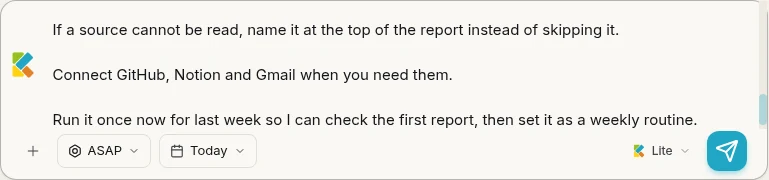
- If a source cannot be read, name it at the top of the report instead of skipping it.
- Connect GitHub, Notion and Gmail when you need them.
- Run it once now for last week so I can check the first report, then set it as a weekly routine.
- Line 1Sets the routine. Kav reads the day, time and time zone, and who the report is for sets its tone.
- Line 2Two sources that change every week. The report can only say what these show, which is the point.
- Lines 3 to 4A fixed shape and a sourcing rule. They become part of the task goal, so the reviewer fails a line or a figure with no source.
- Line 5Holds last week's promises to account. A Next week item that did not ship moves to In progress or Blocked, with a reason.
- Line 6Email leaves the workspace, so it goes through your approval. Your comment on that card is kept for next Monday.
- Line 7Turns an expired sign-in into a visible line in the report, instead of a thin report that looks like a quiet week.
- Line 9Kav runs it once now, so the first Monday is not the first test.
The same job as the Zapier template
The closest Zapier template for this job is Generate and send weekly reports with ChatGPT, create file in Google Drive, and email stakeholders: four steps (Schedule by Zapier, ChatGPT, Google Drive, Gmail), listed in Zapier's AI weekly reporting gallery when we re-read it on 19 Oct 2026. It is quick to start. Here is where the two differ.
| Question | Zapier template | This Kavela routine |
|---|---|---|
| What you set up | A paid Zapier plan (the free plan runs two-step Zaps and this one has four), an OpenAI account with prepaid API billing, and Google Drive and Gmail connections. | Paste the prompt. Answer the GitHub, Notion and Gmail connect cards when Kav asks. |
| What the report is built from | Whatever you put in the ChatGPT step's prompt. None of the four steps reads your repo, tracker or notes, so you add those steps yourself. | The pull requests merged in the last 7 days, your notes page and last week's report, read fresh on every run. |
| What checks it before you see it | Nothing. The ChatGPT output goes straight into the Drive file and the email. | A separate reviewer that checks every line and figure has a source, and cannot edit the report. The run cannot move on until it passes. |
| How it goes out | The Gmail step sends in the same run, so the email goes to your list on schedule with no review step. | One review card with the exact email. It sends only after you approve. |
| When a line is wrong | You correct it after it is sent, and edit the prompt for next week. | It goes back to the same writer with the exact gap, at most three rounds, then to you with what falls short. |
| When you leave feedback | Future reports change only if you edit the prompt in the ChatGPT step. | Your comment on the card is kept as guidance for this job and loaded before next Monday's report. |
| Cost | Zapier Professional from $19.99 a month billed yearly, or $29.99 monthly, for 750 tasks, where each successful step uses a task. OpenAI API usage is billed separately. | Your Kavela plan's credits. Connect your own Claude or Codex and they go further. Kavela is in beta. |
Where the template is better
- Four steps you can open, edit and test one at a time in Zapier's editor.
- Zapier connects to more than 9,000 apps, so almost any data source can feed the report once you add the step.
- It writes the report to a Google Drive file, which suits teams that already keep reports in Drive.
What do you need before you automate weekly reports?
This page is about the written report a founder or team lead sends about the week's work. If your weekly report is a spreadsheet of KPIs, the Excel routes that fill Google's suggestions for "how to automate weekly reports" are the better fit. For the written one, you need six things:
- Sources that change every week. Merged pull requests, issues closed in your tracker, a notes page you add to as the week goes. If the agent has nothing new to read, it writes filler.
- A fixed shape. The same five sections in the same order: Shipped, In progress, Blocked or at risk, Numbers, Next week. Readers learn where to look.
- A sourcing rule. Every line links to the pull request, issue or note behind it, and a figure with no source is written as "not tracked this week".
- Last week's report. Without it, nobody checks whether last week's Next week list actually shipped.
- A recipient list and an approval gate. You read the exact email before it goes to your team, your investors or your client.
- A schedule in your own time zone. A server-time cron sends Monday's report on Sunday night where you live.
How do you set it up yourself with Claude Code or Codex?
Writing the report is the easy half. Here is what the rest takes if you wire it yourself:
- Give it the sources. A Claude Code routine clones the repositories you select at the start of each run, so the last 7 days of merges are in its git history. Your notes need a connector, such as Notion's MCP server.
- Write the rules down once. Put the sections, the word limit and the sourcing rule in
CLAUDE.mdor a skill, so every run reads the same instructions. - Schedule it. Routines run in Anthropic's cloud on Pro, Max, Team and Enterprise plans, with a minimum interval of one hour. Anthropic notes that a run scheduled exactly on the hour "can start several minutes late", so pick 09:07 rather than 09:00 if the minute matters. For Codex, OpenAI says to "keep the computer on and the app running when a scheduled task needs local files" (Codex scheduled tasks).
- Wire the email. The Gmail API creates a draft with
drafts.createand sends it withdrafts.send, which deletes the draft and files the message as sent. That means a Google Cloud project, an OAuth consent screen and a token for the compose scope, or a Gmail connector that does it for you.
The comparison table above sets this against the closest Zapier template for the job, row by row.
Where does the approval go when the report runs on a schedule?
A routine has no one watching it. Anthropic's docs say a routine runs "without stopping for approval", and that Claude "can use every tool from an included connector, including writes, without asking for permission during a run." So if the routine holds a Gmail connector that can send, the report goes out as drafted, invented figure and all.
If you build it yourself, keep the two halves apart:
- The report run writes the report and creates a Gmail draft. It never holds a tool that sends.
- You send it, from the Drafts folder, after reading it. Or a second job sends only the drafts you marked approved.
That split costs one extra click a week and is the difference between "the agent emails my team" and "the agent emails my team what I read."
How do you start it in Kavela?
In Kavela the approval is the unit of work, so the gate is part of the run rather than something you wire around it. What you still do:
- Paste the prompt into Kav, the chat in your Kavela workspace, and replace the parts in angle brackets.
- Connect GitHub, Notion and Gmail when Kav asks, one card per service.
- Read and approve the first report, built from last week. Kav then sets the weekly routine, which runs in the cloud workspace, so your laptop can stay closed.
What goes wrong with automated weekly reports?
- Invented numbers. A model asked for "key metrics" will produce some. The sourcing rule and the reviewer exist for this.
- A changelog instead of a report. Forty pull request titles is not an update. Ask for outcomes grouped under Shipped, with the pull requests as links, not as the text.
- Silent gaps. An expired GitHub sign-in makes a busy week look quiet. The prompt makes a missing source the first line of the report.
- Promises nobody checks. Last week's Next week list quietly disappears. Reading last week's report first is what keeps it honest.
- Sent before anyone read it. Once it is in your investors' inboxes, a wrong line is a correction email. The approval card is cheaper.
Browse all use cases for more jobs you can start the same way.
Stuck on setup? Ask in the Kavela Discord.
Frequently asked questions
Can Claude Code write my weekly report automatically?
Yes. A Claude Code routine can run a report prompt every week in Anthropic's cloud, with your repository and connectors. Anthropic's docs say a routine runs without stopping for approval, so keep the send step out of that routine or behind a gate you control.
Can the agent email the report by itself?
It can, but this setup does not. The run drafts the email in your Gmail and puts the exact text in your approvals. It sends only after you approve, unless you rewrite the prompt to send on its own.
What should a weekly report include?
The same sections in the same order every week: Shipped, In progress, Blocked or at risk, Numbers, and Next week. Every line links to the pull request, issue or note behind it, and the whole report fits on one screen.
How do I stop it inventing numbers?
Make a source mandatory for every figure, and give the agent a fixed phrase for a missing one, such as "not tracked this week". A reviewer that fails any figure without a source catches the rest before you read it.
Can I use Jira or Linear instead of GitHub?
Yes. Change the sources line to name your tracker and the filter you want, for example issues closed in the last 7 days. The report shape stays the same; only the connection Kav asks for changes.
Is it the same setup with Codex?
The prompt and the report are the same. Scheduling differs: Codex scheduled tasks that need local files need the computer on and the ChatGPT desktop app running, while Claude Code routines run in Anthropic's cloud.
What happens to the edits I make on the report?
A comment you leave on the review card is kept as guidance for this job and loaded before next Monday's report, so a correction such as "group fixes under one line" does not need repeating.